 Sprout Affiliate
The iPhone app
There is one Sprout Affiliate app on the App Store, and one download. Its opening screen has two buttons, Affiliate login and Merchant login, and which one you tap decides which of the two apps you get.
Affiliate login is for your affiliates. They sign in with the email and password they set when they joined, the same ones the web portal uses, or with their phone number and password where your store takes phone numbers (see Recruiting). If they have forgotten the password, they can have a reset link emailed instead, which lasts 15 minutes, or a code texted to their phone number. A new phone number entered in their profile is confirmed with a code texted to it before it is saved. They get their link and coupon, what they have earned and been paid, and a way to message you. Free on every plan.
Merchant login is for you. You sign in by tapping a pairing link that Sprout Affiliate generates inside your Shopify admin, never by typing a password or a code, and can approve affiliates, watch referral orders, and run payouts. It is free on every plan, like the affiliate app; the features inside it keep their own plans.
The affiliate app
The affiliate side is free on every plan, including Free. There is no plan check in the affiliate sign-in path, so your affiliates can use it whatever you are paying.
They sign in with their email and password, the pair they chose when they applied. That is what the app tries first. If they have forgotten it, they can ask for a reset link instead: it is emailed to the address on their affiliate record and expires after 15 minutes. There is no emailed sign-in code.
The app opens the first time in the language of the country it is opened in and keeps it wherever the affiliate goes. Settings › Language changes it, for the app, the web portal, and their email alike.
A password can be set or changed in the app under their profile, or in the web portal, and has to be at least 8 characters. Five rules that generate support questions:
- If the email does not match an active affiliate on any store, nothing is sent and no error is shown. That is deliberate, because otherwise a stranger could test addresses to find out who is an affiliate. It does mean "I never got the email" usually means the application is still pending, the email was never confirmed, the account was deactivated, or the address is spelled differently on their record. The match is exact, so a typo in their record is a silent failure.
- Five reset requests per address in any 15 minutes. Further requests are quietly ignored.
- Sitting still never signs a device out. A session ends when they sign out, or when the device is unpaired.
- If you deactivate an affiliate, their app session is deleted the next time the app makes a request.
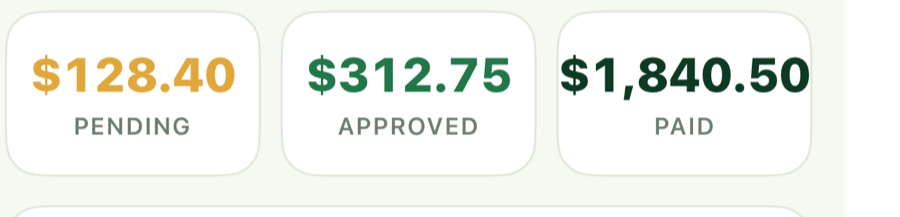
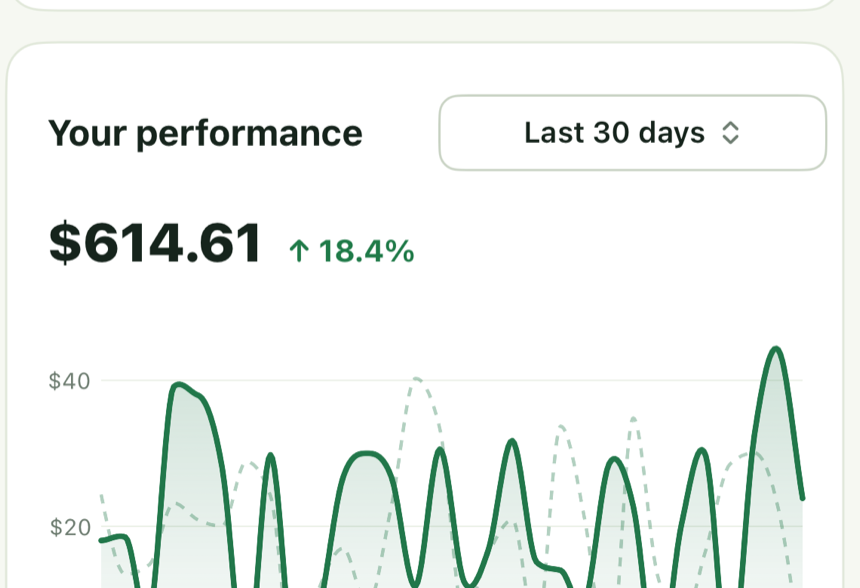
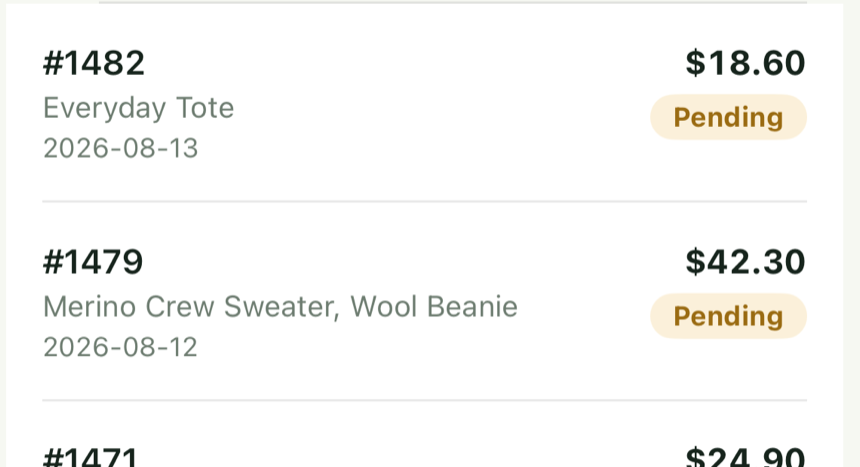
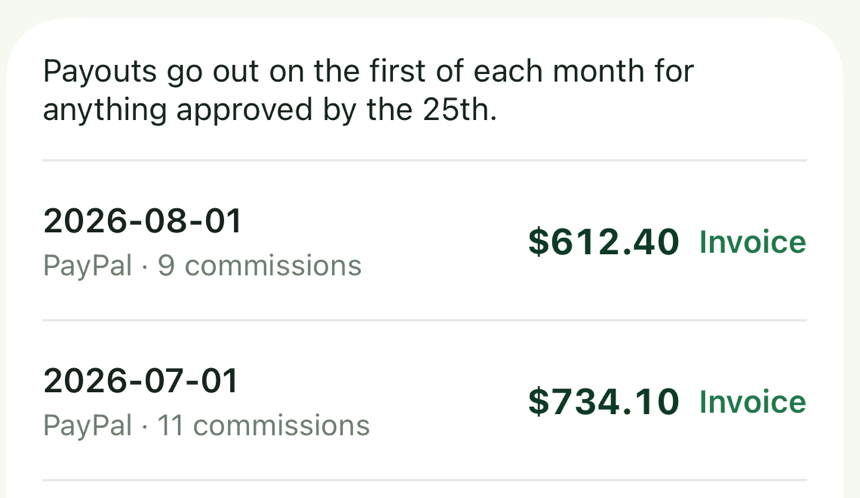
What the affiliate app covers: a Dashboard (pending, approved, and paid commission over a date window, a trend chart, their share link, their discount code, and any program invitations waiting for them), Commission (every referred order with its status), Payouts (past batches, with an invoice the app draws itself), Messages (chat with you), and settings covering profile, password, payout details, tax form (W-9 or W-8BEN), four notification toggles (New commission, Free ($0) referrals, Messages, Announcements), the Sprout network listing, the marketplace directory, their own coupon codes, and saved links.
An affiliate who works with several stores that use Sprout Affiliate can see Commission and Payouts merged across stores, and can switch which account the app is signed in as. Switching only works between active accounts that share the same email address and where both accounts have confirmed that address. Payout details and notification toggles are held per store, so changing them on one store does not change the others unless they tick "Use these details for all my stores" on payout details. Notification toggles are always per store. The payout one skips any store whose program does not offer that payout method, and any store that asks for different details on its own payout form.
Where your store has its own payout form, the app shows your fields for that method in place of its own, as the portal does, and checks them the same way before they save.
Chat, link click stats, the link features (link builder, custom link endings, and short links) and their own extra coupon codes follow your plan and your settings, not anything the affiliate can change:
- Chat needs Growth or higher. On Free, the Messages tab comes back empty and sending returns
Chat is on the Growth plan.The check reads the store the affiliate is signed in as, not the store they picked in a multi-store view, so an affiliate signed in on a Free store sees no chat at all. - Link click stats on their dashboard (clicks, conversion rate, average time on your store, last 30 days) need Growth or higher.
- The link builder, custom link endings and short links need Professional, plus their own switch under Settings, Links: "Link builder: link to any page, and tag where it was posted" and "Allow affiliates to create their own custom links". Short links have no switch of their own in either admin yet.
- Their own extra coupon codes only appear if you ticked "Let this affiliate create their own coupons" on their profile. The "Coupon limit" box beside it sets how many they can have, and it starts at 1.
The merchant app
The merchant side is free on every plan. It used to need Growth, which put the app that approves applications and runs payouts behind the paywall and mostly stopped free merchants using the product at all. The features inside it keep their own plans, checked where the feature is used: a PayPal run and chat need Growth, bonuses and custom links need Professional.
Pairing your phone
- On your iPhone, open your Shopify admin and open Sprout Affiliate.
- Go to Settings and scroll to the bottom of the General tab to "Sprout Affiliate on your phone". On a phone or iPad the card makes a link to open on that device; on a desktop the same card offers Connect a device, which mints the same one-use link for you to open on the phone.
- Tap Pair on this phone, then tap the link that appears. The app opens signed in as the store owner.
You are never issued a merchant password, and there is nothing to type. The pairing link is minted only after Shopify has authenticated you as an admin of that store, so being signed in to your Shopify admin is the entire credential. There used to be a short code to read off the screen and it was removed: a code short enough to read aloud is short enough to be read over your shoulder, and it proved nothing the Shopify sign-in had not already proved.
The link works once and expires in five minutes. Generating a new one cancels the previous unused link for that store, but it does not sign out a phone that is already paired. The phone keeps a pairing per store and switches between them, so pairing a second store never unpairs the first.
What you can do from the merchant app
- Dashboard: what is pending, what you owe, total affiliate sales, active affiliate count, applications waiting, and a chart you can flip between Referred sales, Commission, and Referred orders.
- Affiliates: the full list, plus one affiliate's detail, chart, and orders. Segments are made and edited here too, in the same editor the web admin has, and the list narrows to the one you pick. You can change their rate, make them active or inactive, edit your private note, change their order auto-approval, add or remove coupon codes, and add or remove bonuses. Bonuses need Professional. Rate, status, note, and auto-approval are refused while an affiliate is still pending or unverified, with "Approve their application first".
- Applications: approve or decline. Both send the affiliate the same email the web admin sends, and approving creates their discount code in Shopify exactly as the web does.
- Orders: approve or reject a pending order, or put an approved or rejected order back on hold (including a $0 one, which shows as Paid). A paid order can never be rejected, because the affiliate already has the money while the rejection would credit the fee back. Rejecting a pending order credits back the transaction fee Sprout Affiliate charged on that sale (2% on Growth, 1.5% on Professional, 1% on Enterprise), and if that credit does not go through, the app says so instead of reporting a clean success. The Pending list also carries the web admin's Approve all, as a control you slide rather than tap and then confirm: it approves every pending order in the date window you are looking at, up to 500 at a time. Two steps because approving in bulk cannot be undone row by row, and a thumb resting on a list should never start it. Every row names what was bought as well as the affiliate, the date, how the sale was attributed and the commission, so a list of numbers reads as a list of sales.
- Payouts: a preview that pays nobody and changes nothing, then a manual or PayPal run, for everyone or for one affiliate. A run claims the same per-store payout lock the web admin claims, and a second run is refused while the first holds it, so two devices cannot pay the same affiliate twice. A manual batch can be undone; a PayPal batch cannot, because that money has left. Opening an affiliate in To pay lists the approved orders the amount is made of, and each one names what was bought as well as its number, date, and commission, so you can see what you are paying for without opening the order.
- Analytics, Programs (including creating one), Messages, and the Settings for affiliate and order approval, tax forms, fraud, your marketplace listing, affiliate links, search visibility, notification emails, and the minimum payout.
What the merchant app will not do
The phone has its own product picker, so product-scoped commission and the discount's product scope are both set there, and the tier ladder is edited rung by rung. You cannot connect PayPal from the phone, because that needs a Client ID and Secret pasted in (two long strings you copy from the PayPal Developer Dashboard), which is a job for a keyboard and a password manager; the app shows the connection status only, and a PayPal run refuses until it is connected on the web.
Under Settings, Affiliate login comes first, with the same switches as the web card: Email, Phone number (on the Growth plan and up), a Required switch under each while both are on, and the countries a number is accepted or excluded from. It keeps the same rule as the web, that one of the two is always required.
Right after it, Affiliate portal holds your payout form, as Settings › Affiliate portal › Payouts does on the web: the Default payout fields switch, the method, and the fields, each opened to change its kind, its name or words, its choices, and whether it is required, with a Preview of the form as affiliates see it (see Your own payout form). An affiliate's page lists their payout details the way the web does, including their answers to your form.
Under Settings, Fraud protection has three switches you can change from the phone: "Flag orders where the buyer's name matches the affiliate", "Flag orders placed from the affiliate's own IP address", and "Anti-leak discount protection". The IP address rules for applications can be changed from the phone too. The rest of the fraud settings are on the web only: "Flag orders Shopify rates medium or high risk", the two order limits, the days to wait before automatic approval, and the IP address rules for applications. Matching buyers by email address is not offered anywhere, because it needs Shopify's Protected Customer Data access for email, which this app does not request. A flagged order shows its reason in the phone's order list. See Fraud protection.
Bulk email, CSV export, and imports are web only. A program created on the phone carries its name, the commission, the customer discount, and the payout methods, and starts with a 30-day cookie window (a click on the affiliate's link keeps crediting them for 30 days). Everything else, including that window, is set afterwards by editing the program.
If the live order read from Shopify fails, the app shows pending and approved figures as unknown rather than as zero, and refuses order decisions until it recovers. Paid history still shows, because it comes from Sprout Affiliate's own record of what has been paid.
Push notifications
| Goes to | Sent when | Turned off by |
|---|---|---|
| Affiliate | A referred order credits them a commission | Their own "New commission" toggle, per store |
| You | A new affiliate application arrives | Its own push switch in the phone app, not the "Email me when a new affiliate applies" box in the web admin |
| You | An affiliate brings in a referral order | Its own push switch, with a second one for orders that come to zero |
| You | A scheduled payout goes out | Its own push switch |
| You | A scheduled payout fails, or the money left and could not be recorded | Always sent |
| You | Your PayPal balance is below the next scheduled payout | Always sent |
An affiliate's pushes are in the affiliate's own language, the one their emails use: a new commission, a payment, an answer to a custom link or discount code request, a deduction, and the title of your chat message. The message itself arrives as you typed it.
The merchant pushes have switches of their own, set in the phone app rather than shared with the "Email me when…" boxes in the web admin, so turning off an alert email does not turn off its push, and the other way round. They are sent even when you have no notification email address on file, so a paired phone is a delivery route of its own. Each referral order produces one merchant notification in total, whichever of the two ways Sprout Affiliate hears about a sale gets there first: Shopify's new-order message to the app, or the Web Pixel, the small tracking script Shopify runs on your storefront.
Your chat message pushes to the affiliate. It also emails them, once per conversation per hour rather than once per line, if their "Messages" notification toggle is on. The push is deliberately outside that throttle: a chat window needs a doorbell. A message from an affiliate raises your unread count but sends you nothing.
When something goes wrong
A pairing is meant to last. It is not dropped by a temporary problem. If your store cannot be reached for a moment (for example while Shopify re-authorises the install), the phone is told the store is unavailable and retries; it is not told the pairing is dead. That distinction matters because the app deletes the sign-in token that keeps it paired the moment it is told a pairing is dead, and an earlier version unpaired healthy phones over a momentary gap.
If your plan drops, the app stays open and the pairing stays intact; only the features with a plan of their own stop, each where it is used. If your billing plan cannot be read at all, the app stays open: an unreadable plan counts as a billing hiccup, not as a drop to Free.
Signing out deletes that device's session, which also removes its push token, so a signed-out phone gets nothing. Deleting the app clears the push token as well, because Apple reports it as dead on the next send, but the session itself stays until it is signed out or times out. Reinstalling and signing in registers a fresh token.